
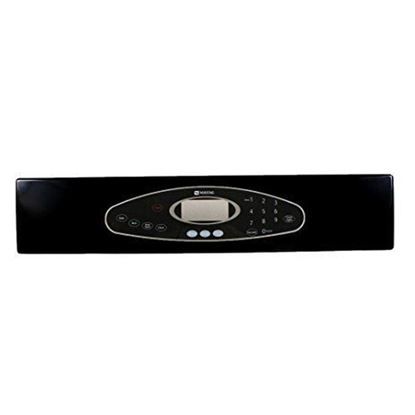
Whirlpool 5765M432-60 Oven Control Panel W/Touchpad Black

Special Price $153.35 Regular Price $259.65
In stock
Available Quantity:   49
SKU
5765M432-60

Product Description

The Whirlpool 5765M432-60 Oven Control Panel with a Touchpad in black features a sleek, user-interface to provide precise control over cooking functions, it is operated electronically to send signals to regulate temperature, cooking modes, and timers. It is designed for efficient usability using touch controls with responsive integration with compatible ovens. It is built sturdy, to operate and it offers better cooking precision. Not only does it improve functionality, but it is a modern touch with a streamlined design for component-consistent and convenient meal preparation.
Manufacturer

✓ This Product Replaces: 74008805, 74008804, 5765M433-60, W10270359
https://www.hnkparts.com/media/catalog/product/5/7/5765m432-60_whirlpool_hnkparts.jpg
Manufacturer Name: WHIRLPOOL
Product Number: 5765M432-60
OEM Part Number: 5765M432-60
Product Description: Panl-Cntrl Black

Choose the best Home Appliance parts and supplies from HnKParts!

  • Same Day Shipping

  • Best Quality And Best Price

  • Wide Range of Inventory

  • Best Customer Service

Have More Questions or Need Help to Place The Order?
Reach us at (866)723-0907 or [email protected]

Write Your Own Review
You're reviewing:Whirlpool 5765M432-60 Oven Control Panel W/Touchpad Black
Your Rating
Customer Questions
What maintenance is required for the Whirlpool 5765M432-60 Control Panel?

Regularly wipe the oven control panel with a soft, damp cloth to remove spills and grease. Avoid harsh chemicals that may damage the touchpad. Inspect buttons for responsiveness and ensure no moisture enters the panel to prevent electrical issues.

What are common issues with the Whirlpool 5765M432-60 Control Panel?

  • Touchpad buttons may become unresponsive.
  • Display may flicker or fail to light.
  • Incorrect temperature readings or unresponsive controls.
  • Oven cycles may not start or stop properly.

Installation Steps

Step1: Turn off power to the oven at the breaker and unplug the unit.

Step2: Open the oven door and remove mounting screws securing the control panel.

Step3: Carefully pull the panel forward and disconnect the wire harness connectors.

Step4: Attach connectors to the new control panel and align it properly.

Step5: Reinstall screws, restore power, and test the touchpad and display functions for proper operation.