The store will not work correctly in the case when cookies are disabled.
We collect user information to provide a better user experience and protect the security of our website. By continuing to use our website, you acknowledge the use of cookies.
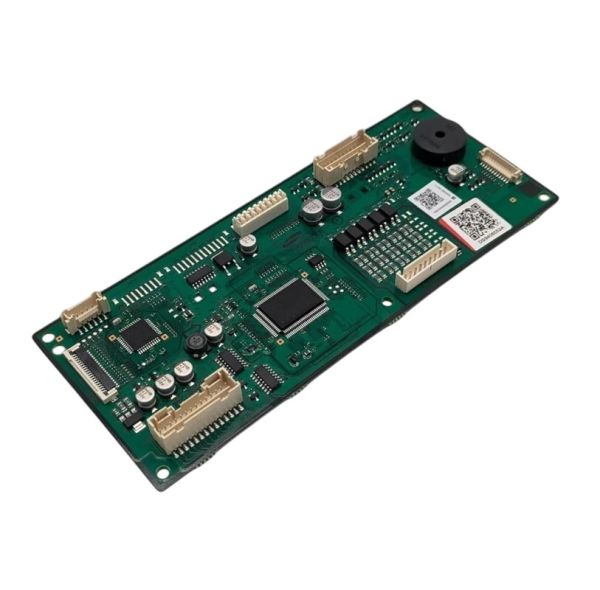
The Samsung DG94-06052A Microwave Oven PCB EEPROM Assembly 4 NE/NX9100D controls the appliance electronic operations by processing operating commands and managing programmed cooking cycles. Installed within the control compartment of the microwave oven and it communicate with components such as the display, keypad, sensors and power circuits to regulate appliance operation. The integrated EEPROM stores operational data and configuration settings required for normal performance. As an essential electronic control assembly, it supports proper operation control, stable system communication and consistent microwave operation.
Provides non-volatile electronic memory within the microwave's control circuitry. The Samsung DG94-06052A Microwave Oven PCB EEPROM Assembly stores programmed information that can remain retained when electrical power is removed. The EEPROM memory device is integrated with a printed circuit board that provides conductive pathways and connection points for communication with associated control electronics.
Electronic Configuration Data:
The memory assembly can provide a designated storage location for programmed information used by the associated electronic control system. Depending on the equipment architecture, stored information may support configuration or other board-level control requirements. The EEPROM itself functions as a memory device and does not directly generate microwave energy, produce heat, or perform mechanical movement.
PCB Memory Communication:
The printed circuit board provides conductive traces and connection points that electrically integrate the EEPROM with surrounding control circuitry. These pathways allow the associated electronics to access or update stored information according to the microwave's programmed control architecture. The PCB therefore serves as the electrical interface between the memory device and connected electronic components.
Replacement Guidelines:
Replacing the Microwave Oven PCB EEPROM Assembly is appropriate if it is damaged, malfunctioning, excessively worn, or otherwise deteriorated. Verify the SAMSUNG part number DG94-06052A and the complete microwave oven model number before replacement. Replace the PCB EEPROM assembly if deterioration affects electronic control, signal processing, control response, or normal microwave oven operation.
Common Failure Symptoms:
Intermittent control responses.
Inconsistent electronic system activity.
Irregular behavior from associated control circuitry.
Unexpected memory or configuration-related behavior.
Failure of associated electronics to respond as expected.
Symptoms that may also originate from other control-system components.
Equipment Compatibility:
The SAMSUNG DG94-06052A Microwave Oven PCB EEPROM Assembly is intended for equipment that specifies part number DG94-06052A. Verify the complete microwave oven model number and manufacturer's parts documentation before purchasing to help confirm the correct application.
What maintenance is required for the Samsung DG94-06052A PCB Assembly?
Inspect the PCB and connectors periodically for secure attachment and dust accumulation. Verify key functions respond correctly during operation. Ensure the assembly is mounted properly and that wiring is intact. Keep the area around the board clean and dry.
What are common issues with the Samsung DG94-06052A PCB Assembly?
Microwave failing to start.
Cooking cycles not starting.
Display not showing correct time or settings.
Heating uneven or inconsistent.
What is the Samsung part DG94-06052A used for?
Samsung DG94-06052A is a PCB EEPROM assembly used within the microwave's electronic control system for non-volatile data storage and communication with associated control circuitry.
What does EEPROM memory do in a microwave?
EEPROM memory stores electronic information so that programmed data can remain retained even when electrical power is removed.
How does the PCB support the EEPROM?
The printed circuit board provides conductive traces and connection points that allow the EEPROM to communicate with the microwave's associated electronic control circuitry.
How can the Samsung DG94-06052A PCB EEPROM Assembly maintain consistent electronic operation?
Its programmed electronic memory and board circuitry retain and process the control information required by the compatible microwave oven's electronic control system.
When should the Samsung DG94-06052A PCB EEPROM Assembly be replaced?
Replacement may be appropriate when electronic deterioration, memory-related faults, physical board damage, or other defects interfere with reliable microwave control operation.
Installation Steps
Step1: Unplug the microwave and remove the outer casing.
Step2: Locate the existing PCB assembly and disconnect all wiring harnesses.
Step3: Unscrew and remove the old PCB carefully.
Step4: Install the new PCB assembly, reconnect all wires, and secure with screws.
Step5: Reattach the microwave casing.
Step6: Plug in the unit and test all functions to ensure proper operation.