
The store will not work correctly in the case when cookies are disabled.
We collect user information to provide a better user experience and protect the security of our website. By continuing to use our website, you acknowledge the use of cookies.
Observance of Labor day 09/07, Monday we are closed [No shippings and deliveries ], Orders received after 3.00pm CST on 09/04/2026 will be shipping out on Tuesday 09/08/2026.
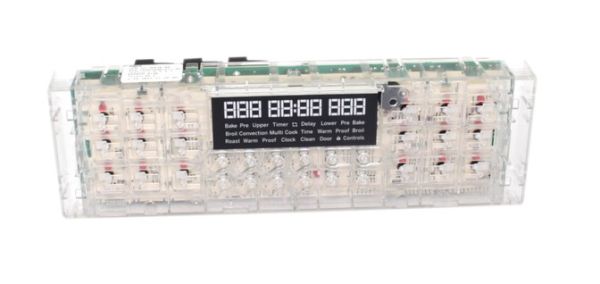
The General Electric WB27X29267 Range Control Board T012 Ele operates by handling heating element management and temperature regulation. This device handles user commands by using temperature sensor data to modify settings for accurate cooking precision. The board positioned in the control panel enables the smooth operation of baking broiling and other cooking functions. This board works with particular range models to enhance performance through optimized heating cycles and improved energy efficiency while providing steady cooking outcomes across various cooking operations.
What maintenance is required for the General Electric WB27X29267 Control Board?
Regularly inspect the control board connections for secure seating and any signs of corrosion. Gently clean the surrounding area to remove dust or food debris. Test all buttons and touch controls for responsiveness. Avoid pressing buttons forcefully to prevent misoperation or short circuits.
What are common issues with the General Electric WB27X29267 Control Board?
Buttons not responding properly.
Cooking cycles not starting.
Erratic temperature settings.
Error codes appearing unexpectedly.
Installation Steps
Step1: Turn off power to the range at the breaker panel.
Step2: Remove the rear control panel cover to access the control board.
Step3: Label and disconnect all wiring connectors carefully.
Step4: Unscrew and remove the old control board from its mounting bracket.
Step5: Install the new board and reconnect wiring securely.
Step6: Restore power and test display and cooking functions.
