
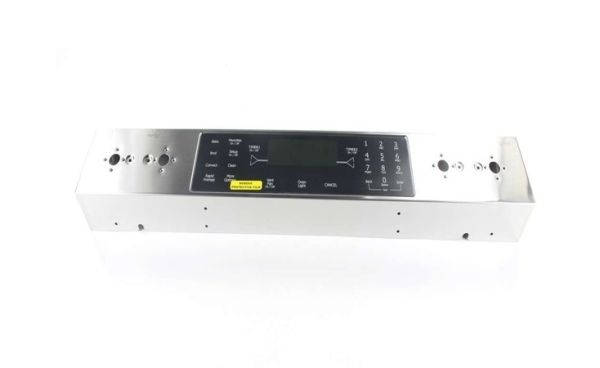
Whirlpool WP5760M373-60 Range Control Panel W/Touchpad

Special Price $250.63 Regular Price $387.54
Out of stock
Available Quantity:   0
SKU
WP5760M373-60

Product Description

The Whirlpool WP5760M373-60 Range Control Panel operates by connecting to the range’s internal system, allowing precise adjustments to cooking settings. It regulates temperature levels, activates baking and broiling modes, and manages timers for accurate cooking times. The panel’s digital or button-based interface sends commands to the heating elements, ensuring even cooking results. It also includes indicator lights or displays to show active functions, making it simple to monitor and adjust settings as needed. By streamlining control over essential cooking features, the panel helps maintain consistent heat distribution, prevents overcooking or undercooking, and improves overall cooking efficiency.
Lights & Lamps,
Manufacturer
✓ This Product Replaces: 74011523, 5760M373-60, 7721P549-60
https://www.hnkparts.com/media/catalog/product/w/p/wp5760m373-60_whirlpool_hnkparts_1.png

This Part Fits the Following Models (3)

Manufacturer Name: WHIRLPOOL
Product Number: WP5760M373-60
OEM Part Number: WP5760M373-60
Product Description: Panl-Cntrl(Range)

Choose the best Home Appliance parts and supplies from HnKParts!

  • Same Day Shipping

  • Best Quality And Best Price

  • Wide Range of Inventory

  • Best Customer Service

Have More Questions or Need Help to Place The Order?
Reach us at (866)723-0907 or [email protected]

Write Your Own Review
You're reviewing:Whirlpool WP5760M373-60 Range Control Panel W/Touchpad
Your Rating
Customer Questions
What maintenance is required for the Whirlpool WP5760M373-60 Control Panel W/Touchpad?

Keep the panel surface clean and dry to prevent residue buildup. Confirm all touchpad buttons respond properly. Verify secure mounting and connections. Test multiple settings to ensure accurate operation and efficient control performance across all cycles.

What are common issues with the Whirlpool WP5760M373-60 Control Panel W/Touchpad?

  • Touchpad not responding consistently.
  • Selected settings not activating.
  • Display showing incorrect status.
  • Delays in registering inputs.

Installation Steps

Step1: Turn off the range and unplug it to prevent shock.

Step2: Remove knobs and screws to detach the old control panel.

Step3: Disconnect wiring harnesses carefully.

Step4: Position the new panel and reconnect wires securely.

Step5: Reattach screws and knobs.

Step6: Plug in and test all touchpad operations.
