
This Part Fits the Following Models (73)
Product Overview:
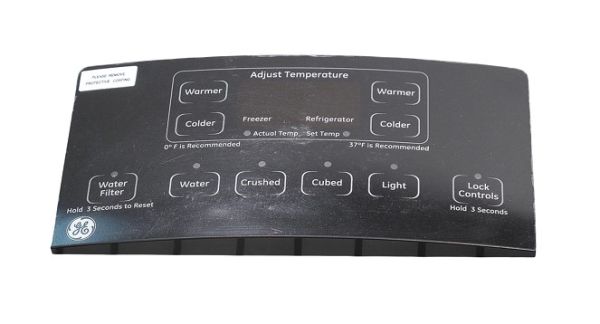
Provides the electronic user interface for applicable refrigerator controls and display information. The GENERAL ELECTRIC WR55X23236 Refrigerator Combined HMI Assembly combines user-input controls and display circuitry within a single electronic interface assembly. It forms part of the refrigerator's electronic control system and supports communication between user selections and connected controls.
User Input Signal Processing:
Detects electrical changes generated by user selections through the interface controls. The HMI circuitry processes these inputs and converts them into corresponding electrical signals for communication with the refrigerator's electronic control system.
Display Signal Interface:
Supports the electronic exchange of display information between the HMI assembly and the refrigerator's connected control system. This allows applicable operating information and interface responses to be presented through the display portion of the assembly.
Replacement Guidelines:
Replacing the Refrigerator Combined HMI Assembly is appropriate if it is damaged or no longer performs its intended interface function. Verify part number WR55X23236 and the complete refrigerator model number before replacement. Replace the assembly if deterioration affects user-input response, display communication, signal processing, or normal interface operation.
Common Failure Symptoms:
- Interface controls becoming unresponsive.
- Display information becoming unavailable or incomplete.
- User selections failing to register.
- Dispenser-related selections not responding as expected.
- Interface operation becoming intermittent.
Equipment Compatibility:
The GENERAL ELECTRIC WR55X23236 Refrigerator Combined HMI Assembly is intended for equipment. Verify the refrigerator model and manufacturer's parts documentation before purchasing to help confirm the correct application.
Technical Specifications:
Brand: GENERAL ELECTRIC
Part Number: WR55X23236
Product Type: Combined HMI Assembly
Appliance Type: Refrigerator
Installation Steps
Step1: Unplug the refrigerator to avoid electrical hazards.
Step2: Open the door and remove any shelves blocking access.
Step3: Unscrew and remove the existing HMI assembly carefully.
Step4: Install the new HMI assembly and reconnect all wires.
Step5: Secure screws evenly to hold the assembly in place.
Step6: Plug in the refrigerator and test the control interface.
